Upgrades
Armoured upgrade blocks queue up here. Shoot one open for a new gun, more damage, faster fire, range, missile storms, repairs or a stronger wall.
 MOB SURGE
Everything you need to hold the line: how a level works, every gun and zombie, powers, upgrades, Survival, rewards and the shop.
Your squad stands behind a barricade at the end of a long street, and the horde walks toward it down the middle. You win a level by killing everything it sends, bosses included. You lose when your last soldier falls.
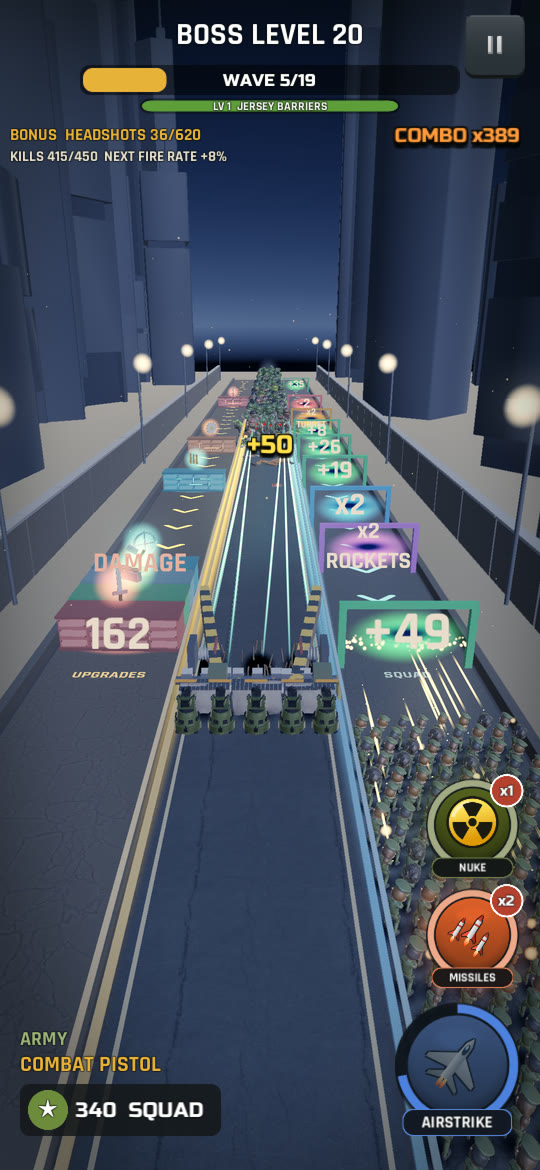
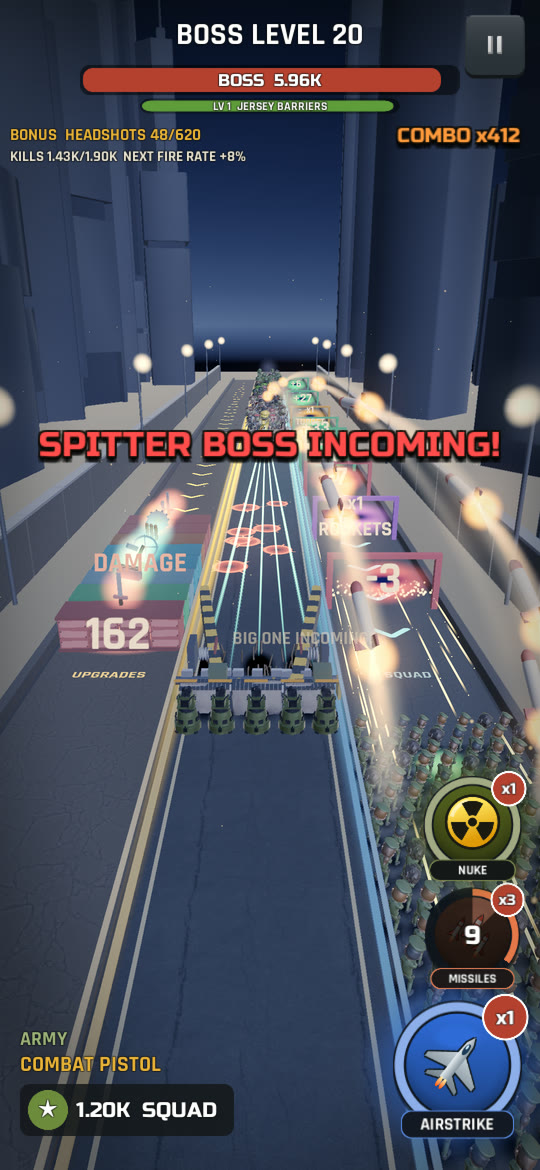
The street has three lanes:
Armoured upgrade blocks queue up here. Shoot one open for a new gun, more damage, faster fire, range, missile storms, repairs or a stronger wall.
Wave after wave of zombies, bosses and explosive barrels. This is the lane you have to hold.
A stream of gates that never stops: more soldiers, rare multipliers, turrets for the wall and rocket launchers.
Every second you spend in a side lane is a second the horde gets closer to your wall. Knowing when to step out and when to get back is the whole game.
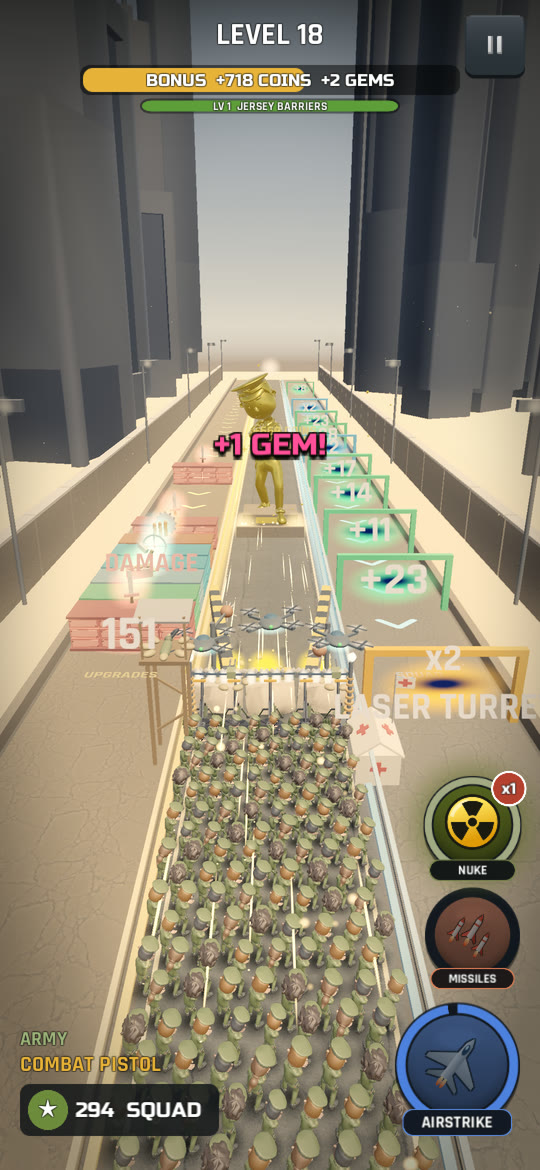
Gates roll toward you down the right lane. Your squad takes a gate by being under it as it reaches the wall, so you can wait in the middle and dash or flick across at the last moment.
Adds that many soldiers.
Doubles your squad. Rare, so don't miss one. Multiplier Rush levels also have the game's only x3 gate.
Takes soldiers away, though never your last one. Shoot it and the number climbs toward green.
Mounts a machine gun, laser or mortar on the wall. See turrets.
Hands your front rank rocket launchers for a short time. See rocket launchers.
Shoot gates to power them up. Green gates count up (to a limit that rises with the level) and red gates climb toward green. Turret and rocket gates go all the way to x5. The bigger your squad, the faster a gate fills, so a handful of soldiers has to work for it. Multipliers stay as they are.
Your squad can grow to 10,000 soldiers. Past that, extra soldiers wait in reserve and step in as soldiers fall. Once the reserve is full, every extra soldier turns into POWER: harder hits and smaller losses for the rest of the level.
Blocks roll in and queue up in front of the wall. The front block shows how many hits it needs, and its armour crumbles as you shoot. Open it and the reward kicks in straight away.
The whole squad switches to the gun shown on the block. Always an upgrade.
Every bullet hits harder.
The squad shoots faster.
Bullets reach further down the lane.
The wall goes up a tier and every section is rebuilt at full health.
Bolts a saw, trap, gun, plating or flamer onto the wall. See wall mods.
Rebuilds every section of the wall to full health.
One more missile storm in stock.
Small quick blocks (damage and fire rate, and a repair once your wall is down to half) come now and then and open fast. The big ones take longer and get tougher as the level goes on, and they only break once they're close enough to read. Everything a block gives lasts to the end of the level, and the next level starts fresh.
Only eight blocks can wait in the lane at once. While it's full, new blocks are skipped for good, so pop the front ones whenever the horde gives you a breather.
The wall across the middle lane comes in three sections, each with its own health. While a section stands, zombies have to beat on it and your soldiers are safe behind it. Once it's destroyed, zombies climb through the gap and fight hand to hand in your ranks, and that is how most squads fall. Running to a side lane won't save you: whatever gets through, bosses included, follows the squad wherever it stands. Spitters and acid reach over the wall whatever its state.
A broken wall doesn't lose the level by itself: you lose only when the last soldier falls. REPAIR and BARRICADE blocks rebuild destroyed sections. There's more in Barricade and turrets.
Last stand: when the wall as a whole drops under 20%, your squad fires 25% faster until it's back over half.
Marked HARD LEVEL on the home screen. A tougher horde and fewer upgrade blocks, but bigger coin pay and bonus gems.
Marked SUPER HARD. Tougher still, and pays even more.
Every 5th level. A giant leads the final wave and the level has a twist. Pays extra gems, plus a nuke if you win without a revive.
Two levels before each boss level. No horde: shoot the golden statue in the middle lane. Every hit pays coins, and you earn gems as it breaks apart.
Level rules. Later levels can carry a rule, named in the intro banner: ARMORED HORDE (tougher zombies, more riot shields), FRENZY (a faster horde), SCARCE SUPPLIES (fewer upgrade blocks) or the friendly SUPPLY SURPLUS (blocks break faster). The tough rules add to the level's coin pay, and the first time you meet one a tip explains it.
Openings. From level 3 every level also opens with a twist of its own: a SUPPLY DROP of quick blocks, a TURRET ON THE WALL, AIR SUPPORT READY, a MULTIPLIER RUSH of gates, a REINFORCED START, LOCKED AND LOADED with the next gun already in hand, or a rough start such as RUNNERS FIRST, CRAWLER AMBUSH, HULK INCOMING or UNDER SIEGE.
Cleared levels can't be replayed: the home screen always shows your next level. Every ten levels the fight moves somewhere new, and the light and weather change from level to level.
Every soldier in your squad carries the same gun. There are 29 of them in strict power order, from the Pistol you start with to the Rail Gun.
The Laser Rifle, Plasma Cannon and Rail Gun are energy weapons sold only in the Armory, and NEW GUN blocks never hand them out. Start a level with one and NEW GUN blocks turn into DAMAGE blocks instead.
| Type | What it's like |
|---|---|
| Pistols | Steady single shots, the heavier ones hitting hardest. |
| SMGs | A fast stream of light rounds. |
| Shotguns | A spray of pellets that hits hard up close but loses punch at range. |
| Rifles | Accurate, keep their damage at range and can punch through into the zombie behind. |
| Snipers | Slow, heavy shots that go through several zombies. |
| LMGs and miniguns | Bullet hoses that keep their damage at range. |
| Energy | Laser, plasma and rail shots at the very top of the list. |
The Armory also dresses your squad. All of this is cosmetic: it changes how the squad looks, never how it fights.
The barricade is your squad's only cover. Melee zombies have to smash through it before they can touch a soldier, so a strong wall buys you time for gates and blocks.
Every level starts with the wall at tier 1, or higher with the FORTIFIED START Base upgrade. Each BARRICADE block raises it a tier and rebuilds it at full health, and every tier keeps what the tiers below it do.
| Tier | Name | What it adds |
|---|---|---|
| 1 | Jersey Barriers | The starting concrete barriers. |
| 2 | Sandbags | More health. Every tier from here adds more. |
| 3 | Steel Plating | Zombie blows on the wall do less damage. |
| 4 | Razor Wire | Zombies leaning on the wall bleed. |
| 5 | Hedgehogs | Zombies close to the wall slow down. |
| 6 | Tesla Coils | Lightning arcs from the wall into nearby zombies and chains on. |
| 7 | Flame Vents | The wall bursts fire at zombies right in front of it. |
| 8 | Concrete Wall | A big jump in health. |
| 9 | Steel Bunker | Acid, spit and rocks do half damage. |
On top of its tier, the wall has five mod slots with ten tiers each: 50 mods in all, each with its own look. A WALL MOD block raises whichever slot is furthest behind, and the matching Base upgrades start every battle with that slot a tier higher. With all five maxed out, a WALL MOD block repairs the wall instead.
Saws and blades on the front of each section shred zombies at the wall.
Nail boards, pits and moats in front of the wall slow and hurt zombies walking up to it.
Guns on the two outer sections pick off the zombies nearest the wall on their own.
A tougher wall, and every blow on it does less.
Spikes, rams and flamers on the side walls strike zombies crowding in front of the barricade.
Blades, traps and wall guns need their section standing. Flank defences keep working even after a section falls.
| Tier | Wall blades | Traps | Wall guns | Wall plating | Flank defences |
|---|---|---|---|---|---|
| 1 | Rebar Spikes | Nail Boards | Floodlights | Scrap Sheets | Spiked Posts |
| 2 | Scrap Blades | Caltrops | Siren Towers | Tire Wall | Wrecking Balls |
| 3 | Twin Buzzsaws | Barbed Wire | Nail Guns | Corrugated Steel | Flame Jets |
| 4 | Saw Wall | Bear Traps | Ballistas | Car Doors | Piston Rams |
| 5 | Chainsaw Rail | Oil Slick | MG Nests | Riot Shields | Spinning Maces |
| 6 | Blade Drum | Glue Pit | Rocket Pods | Tank Treads | Spring Traps |
| 7 | Whirling Scythes | Spike Pit | Tesla Spires | Hull Plates | Grinder Columns |
| 8 | Grinder Rollers | Shock Plates | Laser Emitters | Reactive Armor | Napalm Throwers |
| 9 | Giant Circular Saw | Cryo Vents | Arc Cannons | Titanium Plating | Lightning Rods |
| 10 | Plasma Saws | Acid Moat | Plasma Beacons | Energy Shield | Inferno Cannons |
Orange turret gates in the right lane mount guns on the wall that fire on their own and outrange your squad.
A tripod .50 cal that hoses down the nearest zombie.
A beam that burns through up to four zombies in a line and hits harder the longer it fires.
Lobs shells into the horde where it's about to be. Joins the turret gates a few levels in.
Purple ROCKETS gates hand rocket launchers to your front rank for 12 seconds, up to five launchers at once. Another rocket gate adds more and restarts the clock. Rockets go for whatever is closest to the wall in the middle lane, favouring bosses and big zombies, and they keep firing even while your squad is off in a side lane. Soldiers carrying launchers don't fire their guns until the launchers are gone.
Zombies walk straight down the middle lane toward your wall. New kinds join as you climb the levels, and each one asks for a slightly different answer.
The bulk of the horde. Slow and steady.
Beat it: keep the middle lane covered.
Sprints at the wall.
Beat it: stay in the middle when the sprinters come.
Small, low and very fast, hiding under the crowd. Too low to headshot.
Beat it: traps, turrets and blasts clean them up.
Tall, thin and quick on its feet.
Beat it: steady fire. It doesn't take much.
Very wide, slow, and soaks up bullets.
Beat it: big guns and damage boosts.
Stops short of the wall and lobs acid over it into your squad. The wall can't stop it.
Beat it: kill spitters first. A Steel Bunker halves their acid.
Stops at range and hurls rocks at the wall, or into your squad through a gap.
Beat it: drop it before it settles in, and keep the wall whole.
Bloated and glowing. Bursts when it dies, hurting every zombie around it. At the wall it blows up on the barricade, or in your squad through a gap.
Beat it: pop boomers early, out in the crowd.
Carries a shield that soaks up every bullet until it breaks.
Beat it: keep firing. The Elite sniper and tesla towers ignore shields.
A broad bruiser that hits the wall hard.
Beat it: missile storms go for brutes right after bosses.
Very tough, and bullets don't pass through it.
Beat it: focus fire, turrets and missiles.
The biggest of the horde, with its own health bar. Leads some waves and hits the wall very hard.
Beat it: save a missile storm or fresh turrets for it.
Elites are dark red, a little bigger and marked by a red ring on the road. They come in ELITE PACK waves on hard and super hard levels and take a lot more killing.
Most waves are a mixed crowd, but many are built around one idea. The banner tells you what's coming:
| Banner | What's coming |
|---|---|
| SPRINTERS! | Runners and skinnies. Fast but fragile. |
| BOOMER PARADE! | Boomers packed in among walkers, so one pop sets off the next. |
| SHIELD WALL! | Riot shields and fatties. Slow and tough. |
| ACID ARTILLERY! | Spitters and throwers hanging back to bombard you. |
| GIANTS WITH ARTILLERY! | Hulks or a titan up front with spitters and throwers sheltering behind. |
| STAMPEDE! | A huge rush of runners and walkers that go down easily. |
| CRAWLER SWARM! | A carpet of crawlers. |
| BRUTE SQUAD! | Brutes with riot shields among the walkers. |
| QUIET... GRAB UPGRADES! | A light breather: the best moment to visit the side lanes. |
| ELITE PACK! | A small pack of elites, on hard and super hard levels. |
| FINAL WAVE! | The biggest wave of the level, with the final bosses close behind. |
Bosses walk out of the haze with an escort, a glowing ring in their colour on the road and a health bar overhead. The first time each kind shows up in a level, its name card slides across the screen.
Rushes the wall and punches through it.
Beat it: have the wall standing when it arrives.
Stops every few seconds to lob big acid blobs over the wall into your squad.
Beat it: kill it fast. Missiles and the sniper go for bosses first.
Raises walkers around itself as it comes.
Beat it: focus it down before the crowd grows.
Stamps and roars, then charges the wall at speed.
Beat it: hit it hard before the charge.
Leads every boss level and the last Survival stage. Huge health; fights like a brute.
Beat it: throw everything you have at it.
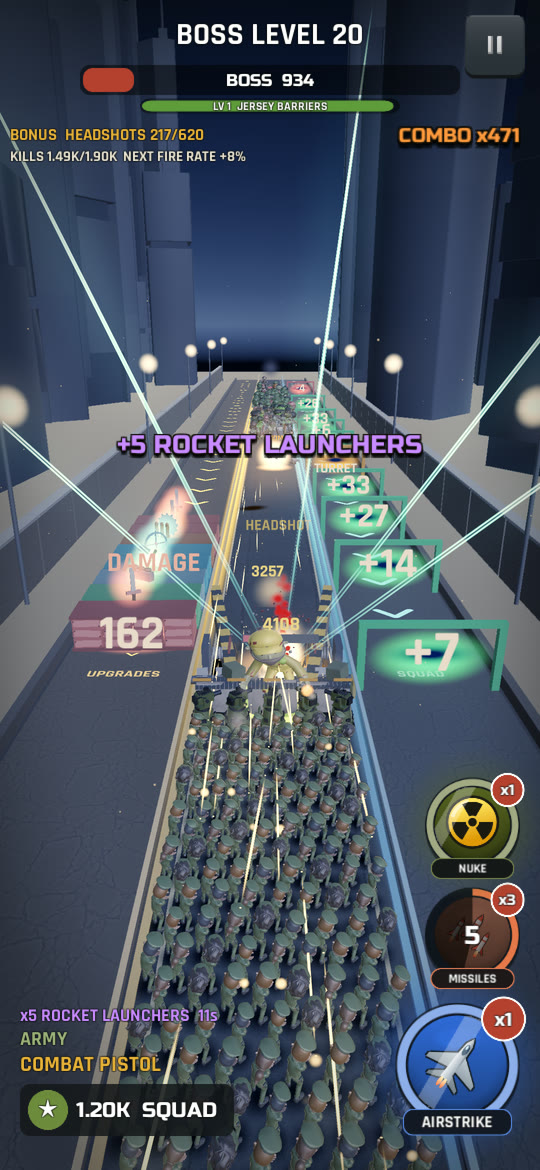
Every boss level comes with one twist, in rotation. The weekly challenge uses the same four.
Every zombie except the bosses is much tougher, and more walkers carry riot shields.
The whole horde moves a lot faster.
Far more boomers and spitters in the mixed waves.
Bosses heal whenever you stop hitting them for a moment. Keep the fire on.
Three round buttons on the right of the battle screen call in help. A ring round each shows its charge, a badge shows how many you have, and a dimmed button can't be used yet.
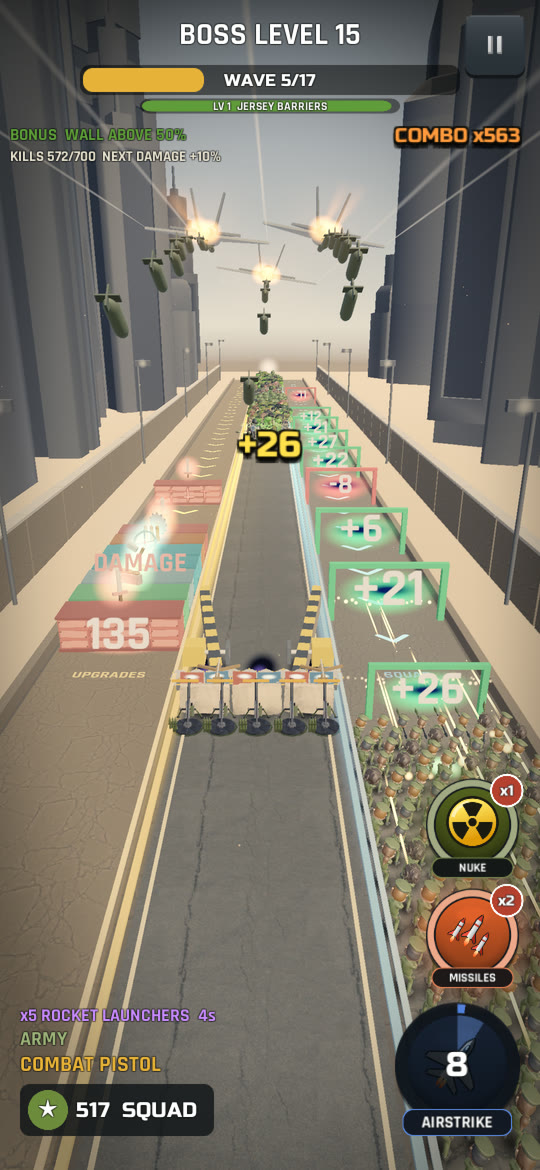
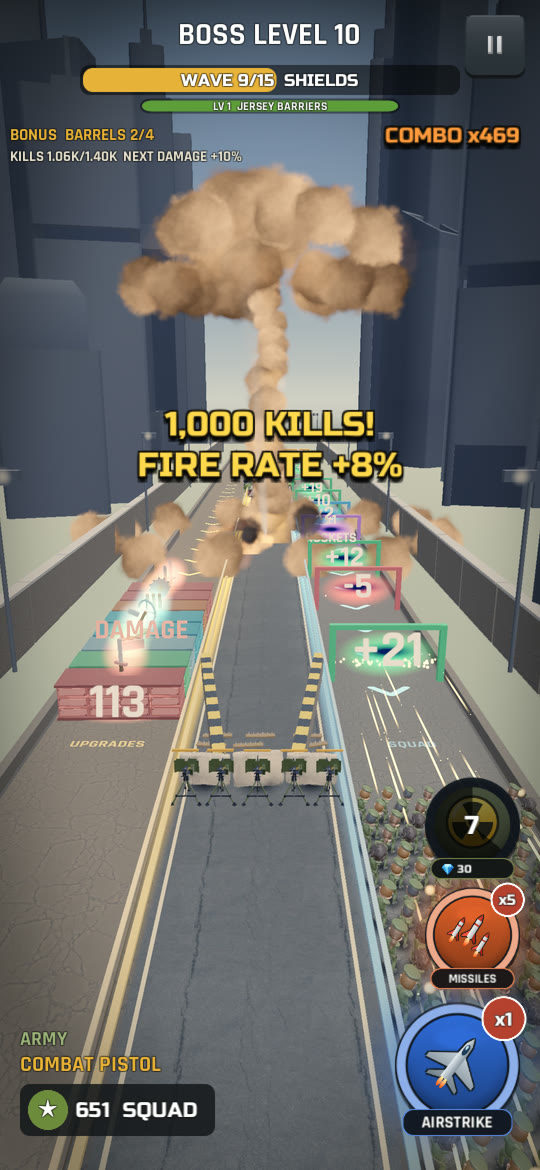
Three jets roar in and carpet-bomb the middle lane, from just in front of the wall to far down the street. The lead jet drops extra bombs on every boss.
Red lock-on rings snap onto twelve targets (bosses first, then brutes, then the zombies nearest the wall) and twelve missiles climb from your squad and dive onto them.
A red target drops onto the road, a warhead streaks down, and the shock wave wipes out every zombie on the road, bosses included. For a few seconds after the blast it keeps killing anything that walks into it. Later waves still come.
Above the PLAY button on the home screen you can buy missile storms and airstrikes with coins, and a nuke with gems, before a level starts. Airstrikes and missile storms you don't use carry over to your next level, up to five of each.
The BASE tab holds permanent upgrades that make every future level easier. Every level you play pays coins, won or lost, so there's always something to put them toward.
| Upgrade | What it does |
|---|---|
| SQUAD TRAINING | Every soldier's bullets hit harder. |
| MARKSMANSHIP | Your squad shoots further. |
| BARRICADE ARMOR | Tougher barricade sections. |
| REINFORCEMENTS | Start every level with more soldiers. |
| SPIKED BARRICADE | Zombies leaning on the wall bleed (bosses are immune). |
| FORTIFIED START | Start every level with the barricade a tier higher. |
| AIR SUPPORT | Airstrikes recharge faster. |
| TURRET ENGINEERING | Turrets last longer. |
| QUARTERMASTER | Upgrade blocks need fewer hits. |
| WAR CHEST | More coins from wins, defeats, bonus goals and bonus rounds. |
| WALL BLADES, TRAPS, WALL GUNS, WALL PLATING, FLANK DEFENCES | Every battle starts with that wall mod a tier higher. |
The YOUR BARRICADE panel at the top of the Base shows your wall live, wearing every mod you've bought. The BASE tab shows a ! whenever you can afford a coin upgrade.
Seven gem-only upgrades put machines beside your squad. None of them can be destroyed, each fights on its own clock, and they join every battle: campaign levels, bonus rounds, Survival and the weekly challenge. Each level you buy makes them stronger.
Gems spent on a revive help once. Gems spent on the Elite Arsenal help in every battle from then on.
Survival unlocks at level 5, from the SURVIVAL tile on the home screen. A run is 30 waves in three stages of ten, and each stage ends with a boss wave.
| Difficulty | Unlocks | What changes |
|---|---|---|
| NORMAL | Always open | The standard run. |
| HARD | Best run reaches wave 10 | A tougher horde, more coins and bigger stage chests. |
| NIGHTMARE | Best run reaches wave 25 | The toughest horde, the most coins and the biggest chests, plus extra gems along the way. |
Every week brings a Survival run on HARD with that week's twist: Armored Horde, Frenzy, Toxic Swarm or Regenerating Giant (see boss-level twists). Play it from the top row of the Survival screen.
LEADERBOARD on the Survival screen shows the top 50 best waves of the week, with your own row and rank pinned at the top. It needs an internet connection.
Stuck on a campaign level? A Survival run is a great way to earn coins for Base upgrades, and everything it pays is kept even when the run ends early.
The REWARDS tab gathers the daily rewards, missions, season pass, ad chest and inbox, and its badge counts how many have something waiting. Daily things reset at midnight UTC.
A seven-day login calendar. Claim once a day: mostly coins, gems on day 3, a nuke on day 5 and a big bundle of coins, gems and a nuke on day 7. Miss a day and the week starts again at day 1.
Three new missions every day, the same for every player: kill zombies, win levels, open blocks, beat bosses, call airstrikes, grow your squad or reach a Survival wave. Each pays coins, some pay gems, and all pay season pass XP. Once a day you can swap one for another with an optional ad.
Win a set number of levels during the week for a gem reward.
Lifetime goals for zombies killed, bosses beaten, levels reached and Survival waves. Each tier pays gems once.
A monthly pass with 30 tiers and two tracks. Earn XP from wins, claimed daily missions and Survival waves. The free track pays coins, gems and airstrikes. The premium track pays more, with missile storms, nukes and the GOLD squad skin at tier 30. Everything resets on the 1st of the month (UTC).
Up to three times a day, a few hours apart, open a chest with an optional ad for coins, maybe gems and maybe an airstrike for your next level.
Every third level you win opens the victory chest: coins, with a chance of gems or a nuke. The victory screen shows your progress toward it.
Every campaign level you finish drops a coin per kill into the piggy bank in the Shop. Once it's nearly full, crack it with optional ads; the third crack breaks it open and pays out a share of the coins inside.
Gifts, event rewards and messages from us arrive in the inbox (the mail button on the home screen). Claim each one once.
Coins pile up while you're away, for up to 8 hours. Collect them from the WELCOME BACK message when you return; an optional ad doubles them.
Some weekends the Blood Moon rises: a red night over the street, a tougher and faster horde, and extra coins from every battle except bonus rounds. The home screen tells you when it's on.
Claim the daily calendar every day. Day 7 is the big one, and missing a day starts the week over.
Mob Surge is free to play. Purchases are optional, and everything you can buy with gems can also be earned by playing. The game shows prices in your own currency.
Gem packs, a coin pack, the VIP Club, Remove Ads, the piggy bank, free coins and gems for watching an optional ad, and a way to turn gems into coins. Early on, a one-time Starter Pack offer also appears for a limited time. Restore Purchases is at the bottom.
Coins buy guns and gun upgrades, squad skins and gear, Base upgrades, and airstrikes and missile storms for your loadout. Every level pays them, win or lose.
Gems pay for revives, nukes, retries with extra soldiers, the premium season pass and the Elite Arsenal, and can be turned into coins. You earn them from wins, chests, missions, achievements, the season pass and more.
It's a one-time purchase that switches off the full-screen ads between levels for good. Rewarded ads, the ones you choose to watch for a bonus, stay available and are always optional.
VIP is an auto-renewing subscription, weekly or monthly. While it's active you get no full-screen ads, extra coins from every win and bonus gems every time you claim your daily reward, plus Elite Arsenal perks. The VIP screen lists every perk, what each is worth right now and when your VIP ends.
It unlocks the premium track of this month's season pass, with gems or as a purchase. It covers the current month only. Upgrade part-way through the month and you can still claim the premium rewards for every tier you've already reached.
Rewarded ads only play when you tap a button that says what you'll get. Full-screen ads only show at a natural break between levels, never in the middle of a fight, and not at all with Remove Ads or VIP. To turn off personalised ads, use Privacy Choices in Settings (where the law requires it) or your phone's advertising settings.
Tap Restore Purchases in Settings, the Shop or the VIP screen, signed in to the same Apple or Google account you bought with. Remove Ads and an active VIP subscription come back. Gem and coin packs are used up when they're delivered, so if one never arrived, contact support with your receipt and player ID.
Subscriptions are managed by Apple or Google, not inside the game:
Cancel at least 24 hours before the current period ends to stop the next renewal. VIP stays on until the end of the period you've paid for. Deleting the game, or your game data, does not cancel a subscription.
Refunds are handled by Apple or Google under their own policies. Ask for one from your purchase history: reportaproblem.apple.com for the App Store, or your Google Play order history.
Yes. Mob Surge is free to play, with optional in-app purchases and ads.
iPhone (iOS 15 or later) and Android phones (Android 8.0 or later).
No. The campaign plays offline. When you're online your progress is also saved to our servers, and the leaderboard, events and inbox gifts need a connection.
No. There's no sign-up and we never ask for your name or email. The game creates an anonymous player ID, shown at the bottom of Settings, so support can find your profile.
On your phone, and on our servers whenever you're online. There's no login, so your progress belongs to the phone it was made on. Purchases are tied to your Apple or Google account and can be restored.
No. Cleared levels can't be replayed: the home screen always shows your next level. Coins keep coming from every try, from Survival, chests and the daily rewards.
Open Settings and set Graphics to MEDIUM or LOW. Fewer soldiers, zombies and effects are drawn on screen, but the fight stays the same: your whole squad still fires and the horde is just as tough. The game also adjusts itself if your phone starts to struggle.
After your first win, the game asks whether it may remind you about things like full offline earnings or a ready ad chest. Reminders are optional and scheduled on your phone; switch them off any time in your phone's settings.
Yes. In the game: Settings, then Reset Upgrades. Every Base upgrade, Elite Arsenal level and gun level goes back to zero and you get most of what they cost back in coins and gems; the game shows the exact amount before you confirm. Your guns, skins and gear stay. It isn't available in the middle of a level.
Open Settings and tap CALL SIGN, or tap your own row on the leaderboard.
In the game: Settings, then Delete My Data. It removes your progress, your cloud profile and your leaderboard entries straight away, and it can't be undone. Purchases stay with your Apple or Google account, so Restore Purchases can bring them back into a new game. Deleting your data doesn't cancel a VIP subscription: cancel that in your store account. You can also email us with the player ID from Settings. See the Privacy Policy.
Email mob.surge.support@gulpgames.com with your player ID (Settings, at the bottom) and, for a purchase problem, the store receipt or order number. There's more on the Support page.
Visit the Support page or email mob.surge.support@gulpgames.com. We answer every message, usually within a few days.